13

Stretch LCD vs Standard LCD: Engineering Guide for Industrial Signage
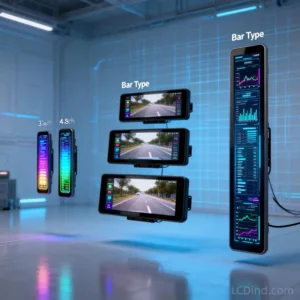
TL;DR: When evaluating Stretch LCD vs Standard LCD for your next hardware project, the decision rests entirely on spatial constraints. Standard LCDs (16:9 or 4:3) are cost-effective and interface-friendly, perfect for traditional HMI. Stretch LCDs (bar type displays) offer ultra-wide aspect ratios (e.g., 16:3) that maximize visual real estate in highly confined spaces like retail shelving, transit vehicles, and server racks.
Core Technical Explanation: What is a Stretch LCD?
In the Stretch LCD vs Standard LCD comparison, the physical manufacturing process is the primary differentiator. Standard LCD panels are produced in high volumes with 16:9 or 4:3 ratios (e.g., 1920×1080). When industrial designers face strict vertical space limitations, a standard display simply will not fit. This is where bar type LCD displays come in. They are manufactured using two distinct methods:
- Native Mask Production: The glass substrate is originally manufactured with an ultra-wide aspect ratio. This ensures excellent sealing, high yield rates, and extended MTBF (Mean Time Between Failures).
- Panel-Cut Process: A standard 16:9 panel is precision-cut using lasers or scribe-wheels to a specific height, then resealed. This process allows for infinite custom display sizing.
Comparison Table: Specifications and Form Factor
| Engineering Metric | Stretch LCD (Bar Type) | Standard LCD Panel |
|---|---|---|
| Typical Aspect Ratio | 16:3, 16:4, 32:9 (Ultra-wide) | 16:9, 4:3, 16:10 |
| Typical Resolution | 1920×360, 1920×540 | 1920×1080 (FHD), 1024×768 (XGA) |
| Interface Protocols | LVDS / MIPI (Custom EDID required) | LVDS / eDP / HDMI (Standard EDID) |
| Enclosure Suitability | Narrow bezels, limited vertical height | Standard square/rectangular chassis |
Selection Framework (If-Then Decision Rules)
Hardware engineers should apply these logical rules when defining the BOM:
- IF your device is a smart supermarket shelf edge, a subway passenger information system, or a 1U/2U server rack monitor, THEN you must select a stretch LCD. A standard display will compromise your mechanical design.
- IF you are building a standard medical ventilator or outdoor ATM where the chassis has ample vertical space, THEN use a standard LCD. This keeps BOM costs low and accelerates the procurement cycle.
- IF your application requires the screen to be mounted vertically (portrait), THEN ensure you specify IPS panel technology to prevent color wash-out at off-axis angles.
Common Mistakes in Procurement
The most frequent error when choosing a stretch LCD over a standard LCD is ignoring the motherboard resolution limits. Because resolutions like 1920×360 are non-standard, many off-the-shelf Android or Linux SBCs cannot natively output the correct video signal. Engineers must either ensure the OS supports custom display timings or procure custom display control boards equipped with an HDMI scaler chip to manage the EDID handshake.
Engineering FAQ
Q: Are stretch LCD displays native mask or panel-cut?
A: We provide both. Native mask offers higher durability, while panel-cut allows for highly custom sizes.
Q: What interfaces do stretch LCDs typically use?
A: Natively LVDS or MIPI. HDMI driver boards are highly recommended for ease of integration.
Q: Can a stretch LCD be mounted in portrait mode?
A: Yes, our IPS stretched panels guarantee symmetrical viewing angles in any orientation.
Q: Is capacitive touch available?
A: Yes, we manufacture custom PCAP touch sensors to match the ultra-wide glass perfectly.
Q: What is the standard resolution?
A: Common resolutions include 1920×360 or 1920×540, depending on the cutting ratio.
Designing a chassis with extreme space constraints?
Request technical drawings and a custom stretch LCD quote from our engineering team today.