
13
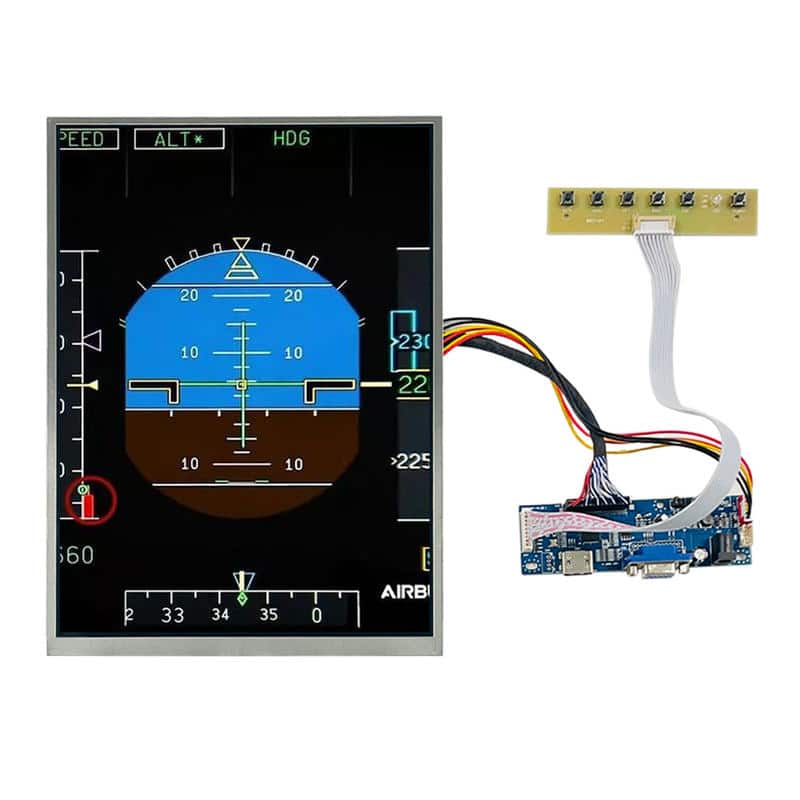
Welcome to the ultimate 12 Inch 1200×1600 LCD Display Guide for simulator enthusiasts. Finding the perfect screen is the critical first step for building a realistic Boeing 737 FMC or Airbus A320 MCDU.
If you are planning a home cockpit project, you have likely encountered a major problem: finding a screen with the correct aspect ratio. Most monitors on the market are designed for landscape use. However, avionics instruments—especially Flight Management Computers—require a vertical format.
In this technical guide, we will explore why a dedicated 12 Inch 1200×1600 LCD Display is the secret weapon for professional simulator builders and industrial engineers.
What is a “Native Portrait” Display?
Unlike standard screens that are 1600×1200 (Landscape), a specialized 12 Inch 1200×1600 LCD Display is manufactured with a “Portrait” scan direction.
This distinction is vital due to pixel structure. Using a landscape panel vertically often results in a “negative grey inversion” effect, where one eye sees a darker image than the other. Our industrial modules utilize IPS technology (In-Plane Switching), ensuring the image remains perfect from every angle—whether you are the pilot or the co-pilot.
What is a "Native Portrait" Display?
Unlike standard screens that are 1600×1200 (Landscape), a specialized 12 Inch 1200×1600 LCD Display is manufactured with a “Portrait” scan direction.
This distinction is vital due to pixel structure. Using a landscape panel vertically often results in a “negative grey inversion” effect, where one eye sees a darker image than the other. Our industrial modules utilize IPS technology (In-Plane Switching), ensuring the image remains perfect from every angle—whether you are the pilot or the co-pilot.
12 Inch 1200x1600 LCD Display Guide: Top 3 Features
1. Perfect Aspect Ratio for Avionics
The 3:4 vertical aspect ratio of a 12 Inch 1200×1600 LCD Display perfectly matches the geometry of real-world Flight Management Systems. With a high pixel density, the text on your navigation legs and performance pages will look razor-sharp, mimicking the CRT or LCD units found in real jets.
2. High Brightness for Realism
Cockpits are filled with ambient light. Standard laptops offer only 250 nits of brightness. Our industrial 12 Inch 1200×1600 LCD Display boasts 750 nits, making it sunlight-readable. Your instrument data will pop, even if your simulator is near a window.
3. Industrial Durability
This is not a consumer tablet screen. It is built to operate in temperatures ranging from -30°C to +85°C. Whether your simulator rig is in a cold garage or a warm server room, this display provides consistent performance.
Technical Breakdown: 40-Pin LVDS Interface
Integration is key for DIY builds. This module uses a standard 40-Pin LVDS interface.
Bandwidth: Supports high-speed data for lag-free instrument updates.
Compatibility: Works seamlessly with universal LCD controller boards to convert the signal to HDMI or VGA for your PC.
Conclusion
Stop struggling with rotated landscape monitors that ruin your immersion. For vertical applications like the MCDU, ECDIS marine charts, or handheld industrial terminals, the native 12 Inch 1200×1600 LCD Display is the professional choice.
Upgrade your setup today and experience the difference that a high-brightness, vertical IPS panel makes.
Frequently Asked Questions
What is the difference between 1200x1600 and 1600x1200?
The difference is the orientation. A 12 Inch 1200x1600 LCD Display is a "Portrait Mode" panel (taller than it is wide), ideal for vertical instruments like an MCDU. A 1600x1200 panel is "Landscape Mode" (wider than it is tall).
Can I use this 12-inch display for a Boeing 737 FMC?
Yes. While the real 737 FMC screen is smaller (usually around 5-6 inches), many home cockpit builders use a larger 12 Inch 1200x1600 LCD Display mounted behind the main instrument panel (MIP) to display multiple vertical instruments or a large centralized EFB (Electronic Flight Bag).
Does this display support HDMI input?
The raw panel uses a 40-pin LVDS interface. To use HDMI, you need to pair it with a compatible LCD Driver Board. We supply these boards as a kit to ensure plug-and-play compatibility with your PC.


